

Track A/P Invoices Out for Approval in VISUAL
The 80/20 rule is typical here but what is the best way to deal with the 20% that are discrepant between the PO price and the invoice price?
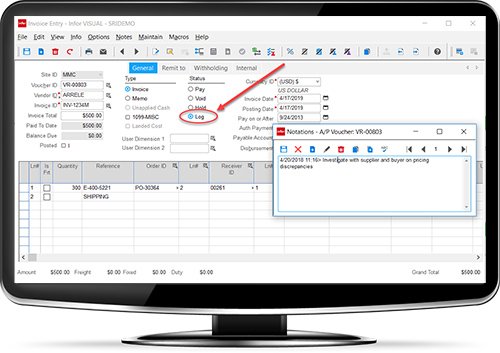
Consider using the Logged Status in VISUAL ERP Payables.
When vouchering the PO receipts and the PO price does NOT match the A/P invoice, make your best assumption so the header and line cost agree and save the A/P Voucher in the Logged Status. You can also use Voucher Notations to indicate reasons why status is set to LOG and detail and track next steps for approval.
A/P Vouchers in the Logged Status do NOT post thus enabling edits should your assumption need tweaking. Also, summary and detail reports as well as the VISUAL search are available to ascertain what is out for approval (in the logged status).
No more yellow stickies or other control documents necessary.
Upon receipt of the approval or discrepancy, make edits required if any, simply change status to pay and save the A/P voucher.
Authored by: Jack Hughes, CPA
Synergy Resources, Director Business Systems Deployment
This is yet another way VISUAL ERP can streamline your operations.
 By Synergy Resources